You have probably been here. You build something that genuinely works - a pricing monitor, an inventory alert, a supplier risk dashboard, an automation that saves you four hours a week. It runs on your laptop or a personal server. You show it to colleagues. They want it too.
Then comes the question: can we deploy this properly? And that is where most good ideas hit a wall.
There are many reasons that wall exists - IT governance, data access policies, licensing, the pace of change management. But there is one I had not fully appreciated until I went deep on this.
The security model of a personal setup and the security model of an enterprise deployment are not just different in degree. They are different in kind. And the gap is wider than most people building home tools realise.
How I ended up here
If you have been following Build Log #2-1, you know I have been running fourteen AI agents simultaneously across a simulated supply chain - demand sensing, procurement, logistics, quality, and more, all working in parallel.
At that scale, cloud model subscriptions start showing their limits fast. Rate caps that throttle agents mid-loop. Token quotas that reset on someone else's schedule. Costs that compound when every agent makes multiple calls per cycle. Context limits that constrain how much operational data each agent can hold at once. And the constant background concern of sending sensitive data to external APIs.
I looked for a ready-made PC and could not find one that matched what I actually needed. So a few weeks ago I started buying components and assembling my own AI server from scratch - a local setup running Gemma and Qwen models, accessible from multiple devices at home and remotely. The second GPU is still in transit, but the rest of the build is up and running. This is may be a separate adventure I would need to share with community.
The moment I started thinking seriously about remote access, shared model endpoints, and multiple devices and agents querying the same server, one question kept coming back: how do I actually secure this?
That sent me into a rabbit hole I had not planned for. I enrolled in a hands-on cybersecurity training programme through TryHackMe, started working toward a formal certification, and spending past days to deep dive on how modern systems get compromised - particularly in the context of AI and automation tools.
What follows is what I learned. Not a technical security manual - I am a supply chain professional, not a security engineer. But a clear picture of something that will matter to every operations leader experimenting with AI tools and the ambition to eventually bring those tools into their organisation.
How systems actually get compromised
The surprise from the training: most major software breaches in recent years did not start at the server. They started at a developer's laptop.
Let me explain why that matters in plain terms.
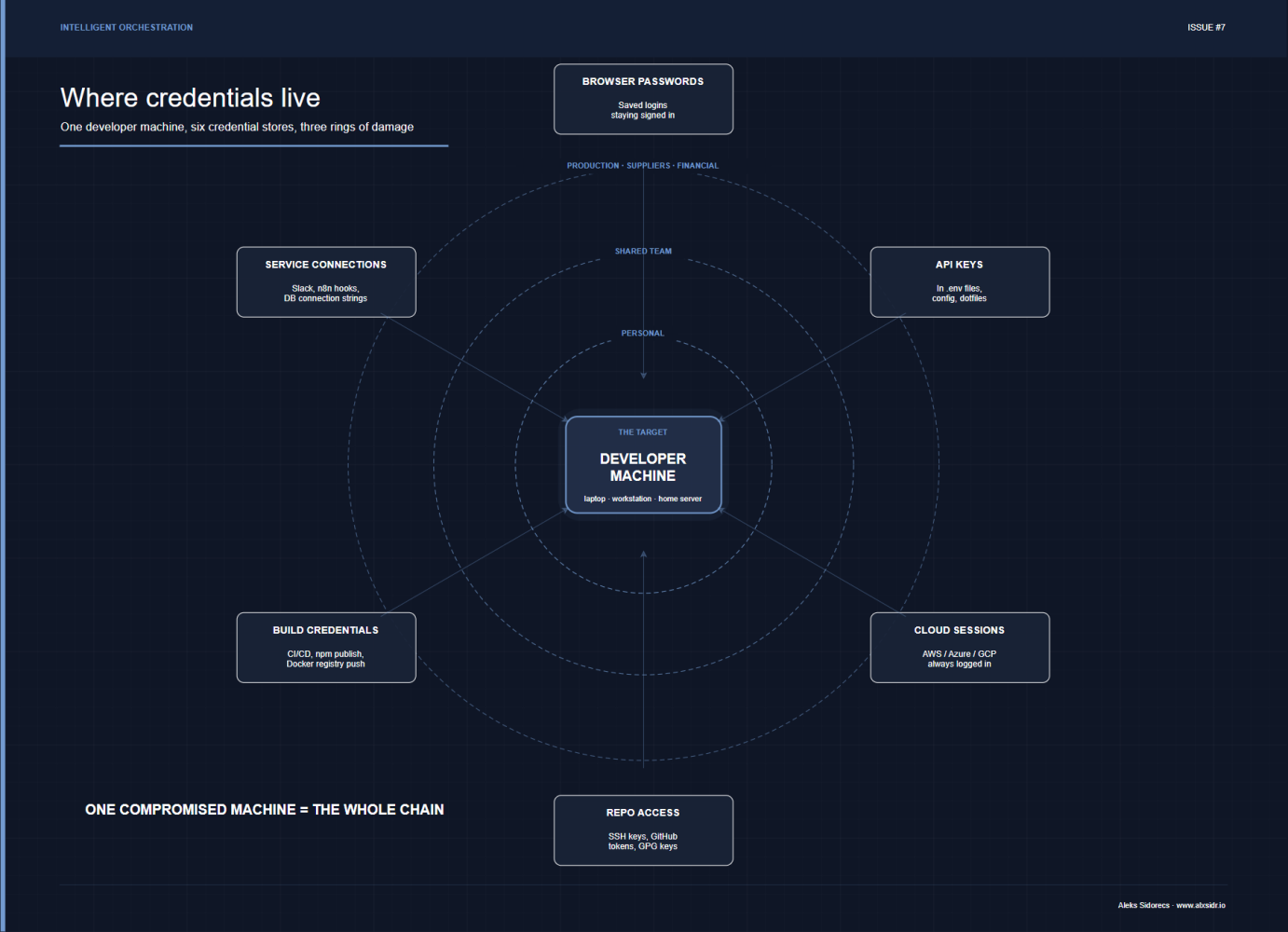
When a developer - or any technically capable person - builds tools and connects them to systems, their machine tends to accumulate access. Passwords saved in browsers. API keys stored in files. Connections to cloud services that stay logged in. Access to code repositories. Credentials for publishing software or pushing updates. Over time, that single machine becomes a kind of master key to everything they have ever built or connected to.
Attackers have figured this out. Instead of trying to break into a well-defended company server directly, they go after the person who built the thing - because that person's laptop often holds the keys to everything, with very little of the protection a server would have.
The three biggest software supply chain incidents of recent years all followed this pattern.
- The 3CX case - a company that makes phone software used by hundreds of thousands of businesses - was traced back to a single employee who installed a trojanised trading app (X_TRADER) on their personal computer. From that one machine, attackers eventually reached the company's software build system and embedded malicious code in the official product update. Customers downloaded it thinking it was a legitimate security patch.
- The SolarWinds incident - which reached the US government and thousands of organisations worldwide - worked the same way. Attackers got into the development infrastructure first, then quietly modified the software during the build process so that every official update that went out was already compromised. It went undetected for over a year.
- The XZ Utils incident was perhaps the most patient of all. An attacker spent two and a half years building a fake identity, making genuine contributions to an open-source project, earning the trust of the real maintainer, and eventually gaining the access needed to slip a backdoor into widely-used Linux software. The malicious code was hidden so carefully it only activated in specific conditions - and it was caught almost by accident, by a Microsoft engineer noticing a half-second performance regression.
The common thread: the attack started with a person, not a system. And specifically, with the access and tools that person had accumulated.
Why this is directly relevant for personal experiments
If you are building AI tools, automation scripts, or data pipelines at home or on a personal server, you are doing exactly what developers do. You are connecting things together. You are accumulating access. Your machine has API keys, passwords, connections to services, and potentially access to data you use for testing.
That is fine for a personal project. The risk is contained because the blast radius is limited - if something goes wrong, the damage is largely limited to what you personally have access to.
The problem comes when you start moving toward enterprise deployment, because two things change simultaneously.
First, the access gets bigger. Now your tool is connected to real systems, real data, production environments. The credentials it holds are not just your personal ones - they are service accounts with access to supplier data, financial systems, operational infrastructure.
Second, the tool becomes a target. A personal project on a laptop that only you use is not interesting to an attacker. A tool integrated into an enterprise system, used by dozens of people, connected to operational data - that is a different proposition entirely.
The three things I would think about first
Based on everything I went through - the training, the research, the incident case studies - here is how I would frame the conversation for any supply chain leader evaluating their own experiments.
1. Who holds the keys, and how long do they last?
Most personal tools are built with permanent credentials - API keys that never expire, passwords saved in configuration files, cloud connections that stay active indefinitely. This is convenient for building and testing. It is a significant problem at enterprise scale because a single compromised machine, a single phished employee, or a single leaked file exposes everything those credentials have access to.
Enterprise deployments need time-limited credentials that expire automatically, access that is granted for specific purposes and revoked when not needed, and clear records of what connected to what and when.
2. Where does your stack come from?
Modern tools - including AI tools - are built on top of enormous stacks of other software. When you install a library, a plugin, an extension, or an AI tool on your machine, you are also installing everything that tool depends on, often without knowing it. Some of those dependencies have been quietly compromised.
The TryHackMe training made this concrete for me: attackers now routinely publish software that looks legitimate - similar name, professional readme, real-looking package - specifically to trick developers into installing it. Once installed on a machine with enterprise access, it harvests credentials silently. Sonatype's State of the Software Supply Chain report identified more than 500,000 malicious packages across major code repositories in a single year.
This is not a theoretical risk for supply chain tools. If your team is using AI assistants, automation tools, or open-source libraries to build operational solutions, the question of where that software came from and whether anyone is monitoring it for compromise is not paranoia - it is basic due diligence.
3. What happens when the person who built it leaves?
This is the operational continuity question that security makes urgent. Personal projects built by an individual tend to have credentials and access tied to that individual. When they leave - or when their account is compromised - the question of how to cleanly revoke access without breaking everything becomes very hard to answer.
Enterprise deployment requires that access is tied to roles and systems, not to individuals. That sounds obvious until you try to retrofit it onto something that was built as a personal project.
The three things I would think about first
- Permanent credentials, even in testing. Long-lived API keys are convenient in development and almost always survive into production unless someone explicitly breaks the habit. Build the right one from day one.
- Treating "it's just a tool" as exemption. The most damaging incidents came through utilities - a plugin here, an extension there - not through the core application. AI coding assistants, automation plugins, and workflow tools all run with significant permissions on the machines they are installed on.
- The works on my machine -> ready for enterprise leap. That gap is real, it is significant, and it is not primarily a technical gap. It is a security architecture gap. Building something that functions is genuinely different from making it deployable in an environment where the blast radius of a failure matters.
My final reflections
I came away from this research with a much clearer picture of why the wall between personal innovation and enterprise deployment is as high as it is. Some of that wall is bureaucracy. Some of it is legitimate governance. But a meaningful part of it exists because the security requirements genuinely are different - and the incidents that result from ignoring that difference are not minor inconveniences. They are the kind of breaches that take months to detect and years to recover from.
For supply chain professionals experimenting with AI tools: keep building. The experimentation is valuable. The instinct to automate, to monitor, to analyse - that is the right direction. But go into the enterprise conversation knowing that the security architecture question is not a formality to be managed after the fact. It is one of the first questions to answer, and it will shape what you build from the ground up.
The good news is that asking it early is far cheaper than retrofitting it later.